While ArcGIS Pro is a powerful tool for creating custom maps, some organizations need to produce hundreds or even thousands of map sheets to an extremely strict and consistent standard. This is where ArcGIS Production Mapping comes into play. It is a dedicated extension for ArcGIS Pro, designed to standardize, automate, and manage large-scale map production workflows.
Imagine that you are not just making a single map, but operating an entire map “assembly line.” Production Mapping provides the tools and processes to ensure that every output from that line, whether a topographic map, a nautical chart, or an aeronautical chart, complies exactly with predefined specifications, increasing productivity and minimizing errors.
Technical Capabilities and Practical Applications
Production Mapping covers the entire map production lifecycle, from data management, editing, and presentation to publishing the final product.
1. Data Management and Standardization
The foundation of a quality map product is standardized input data.
- Technical capabilities:
- Product Files: This is the heart of Production Mapping. It is a configuration file (XML-based) that defines all the rules and specifications for a specific type of map product. It includes:
- Which data layers will be used.
- Rules for symbology and labels.
- The layout structure and the positions of components such as the grid, legend, and scale bar.
- Data quality check rules.
- Integration with Data Reviewer: Deep integration with ArcGIS Data Reviewer to enforce the quality check rules defined in the Product File, ensuring that data complies with standards before and during production.
- Product Files: This is the heart of Production Mapping. It is a configuration file (XML-based) that defines all the rules and specifications for a specific type of map product. It includes:
- Practical application:
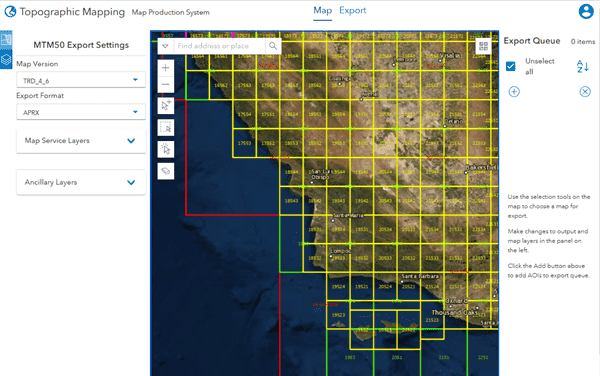
- A National Mapping Agency needs to produce a series of 1:50,000 topographic maps for the whole country. It creates a single “Product File” for this series. This ensures that every map sheet, even when edited by different staff at different times, has the same look, symbology, and quality, from the color of rivers and streams to the font of place names.
2. Efficient Editing and Data Capture
Production Mapping provides tools that speed up and standardize the creation and editing of data.
- Technical capabilities:
- Specialized Editing Tools: Provides advanced editing tools that solve complex tasks commonly encountered in map editing, such as smoothing lines, creating right angles, or simplifying features.
- Feature Builder: A powerful tool that lets you digitize complex features quickly. For example, to draw a building complex with a courtyard, you simply draw a large rectangle, then draw a small rectangle inside it, and the tool automatically creates a polygon feature with a hole in the middle, following the proper topology rules.
- Practical application:
- When updating cadastral maps, technicians use Feature Builder to quickly digitize land parcels with complex shapes, significantly reducing editing time compared with standard drawing tools.
3. Advanced Cartography and Map Finishing
This is where Production Mapping demonstrates its automation power most clearly.
- Technical capabilities:
- Product Layout: Automatically creates and arranges components on the map layout based on the rules in the Product File. When you create a new map sheet, the system automatically adds the map frame, grid, legend, scale bar, north arrow, and other metadata in the specified positions.
- Database-Driven Cartography: Lets attributes in the database control not only the choice of symbol but also the properties of that symbol (for example, size, color, and rotation angle).
- Views and Atlases: Enhances the Map Series functionality of ArcGIS Pro, making it possible to create large and complex atlases. It can automatically calculate the optimal arrangement of map sheets on a print page to save paper.
- Practical application:
- A hydrometeorological agency needs to publish an atlas of river basins for a large region. It uses the Atlas function to automatically generate hundreds of map pages, each showing one river basin in detail, with the layout and information presented consistently across all pages.
- In the production of maritime charts, symbols for buoys and beacons must display the exact rotation angle. Production Mapping uses an attribute field in the data to rotate these symbols automatically, instead of the editor having to rotate each one manually.
4. Workflow and Product Management
Production Mapping helps manage the entire production lifecycle.
- Technical capabilities:
- Product Library: A central workspace for managing “Product Files” and related resources.
- Integration with ArcGIS Workflow Manager: Can be integrated with ArcGIS Workflow Manager (another extension) to create a controlled production process, track each person’s work progress, and ensure that steps are carried out in the correct order.
- Practical application:
- In a military organization, producing an operational map requires many steps and approvals at multiple levels. Integrating Production Mapping with Workflow Manager ensures that an employee cannot perform the “Printing” step if the preceding “Quality Check” step has not been marked “Completed” by a manager.
Conclusion
ArcGIS Production Mapping is not a tool for everyone, but for organizations tasked with producing standardized map products in large volumes, it is an indispensable solution. By replacing manual, repetitive tasks with automated, rule-based processes, Production Mapping helps these organizations save time, reduce costs, strengthen consistency, and raise the overall quality of their important map products.