Overview of ArcGIS Desktop
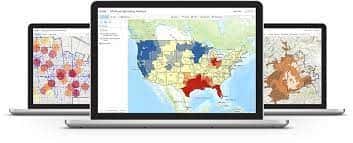
ArcGIS Desktop is Esri’s powerful desktop GIS software for creating, analyzing, managing and sharing geographic information to support decision-making. ArcGIS Desktop lets users create and edit maps, perform spatial analysis and manage data. Users can import many data formats and use analysis tools and spatial data processing workflows to identify spatial features and trends and to visualize the relationships between real-world objects.
ArcGIS Desktop comes in three editions: Advanced, Standard and Basic. Apart from additional functions, each higher edition includes the functions of the lower editions.
ArcGIS Desktop includes two main applications, ArcMap and ArcGIS Pro. ArcGIS Pro is the new desktop GIS platform, built on 64-bit computing with outstanding technology. ArcGIS Pro provides professional 2D and 3D mapping tools in a very intuitive user interface. It is fair to say that ArcGIS Pro is a major leap forward in visualization, analysis, imagery processing, data management and data integration.
ArcGIS Desktop includes (but is not limited to) the following functions:
1. Data exploration and map presentation
- Create and open a map to explore information in data layers; turn layers on and off, query attribute information and display geographic information.
- Automatically generate map series in bulk by map tile or by a chosen geographic area.
- Customize the application by adding functions to simplify the interface.
- Automatically reproject data on the fly when displaying vector or raster data whose coordinate system differs from that of the current map.
- Display raster data in many formats: by pixel value ranges or by a set of given criteria.
- Tools to display how data changes over time.
- Query and search features by spatial location, by attribute information and by address.
- Change the transparency of data layers to make overlapping features easier to see.
- Display labels from the attributes of any point, line or polygon data, with options to customize label placement on the map, for example:
- Automatically detect conflicts between labels on the map
- Set label display priorities
- Rotate labels using a variety of special options
- Turn labels on and off for each layer
- Use programming languages such as JScript, Python and VB to add complex content to labels
- Convert labels to text (annotation) so they can be moved and edited to exact positions.
- Bookmark map extents to quickly navigate to those locations.
- Easily create charts and reports from data.
- Create map frames and grids according to standards.
- Quickly display basemaps.
- Display attribute fields, including field names shown in Vietnamese.
- Create dynamic legends (which update automatically when data symbology changes).
- Control the display of each feature layer based on scale.
- Manage access to each data field (read-only or editable).
- Convert graphics into feature classes in a database.
- Create and save the symbology of feature classes in a database, allowing graphics to be displayed and edited without affecting the source data.
- Use masks for selected feature layers.
- Place point symbols along lines.
- Support BMP, JPEG and PNG formats when presenting symbols.
- Export maps to many print-ready formats: PDF, TIFF, BMP, PNG, JPEG.
- Lay out map pages for printing as required.
- Directly display a number of web map services.
- Control which features in a layer are displayed on the map through functions.
- Display point, line and polygon data in the same data layer.
2. Data editing
- Basic data editing functions: add, delete, copy and reshape features.
- Merge and split polygons.
- Draw features precisely by coordinates and by direction.
- Easily update feature attribute information.
- Edit feature classes that have spatial relationships: when one feature is edited, related features change automatically.
- Attach images and PDF files to data and display them when a feature is selected.
- Snapping mode to reduce errors when drawing features during editing.
- Split polygons with a given line, or create lines from polygons.
3. Data management and validation
- Tools to organize all groups of GIS data, maps, tools and other GIS content.
- Create, modify and delete attribute fields.
- Define spatial validation rules for data, for example:
- Polygons in the same data layer must not overlap
- There must be no gaps between polygons
- Points must not snap to lines
- Polygons must have boundaries that follow lines…
- Error management mechanism for validation:
- Display a list of errors and easily navigate to each error
- Export the error list as a table
- Manage corrected errors and errors that are allowed to be ignored
- Tools to create multiuser databases that allow many people to access and edit data at the same time.
- Create data versions to reduce conflicts during multiuser editing.
- Manage data replicas, allowing export to child databases and synchronization back to the central database.
- Manage large volumes of imagery, with search, image filtering and configurable image preprocessing modes.
- Read and manage LiDAR data.
- Convert between coordinate systems.
- Quickly search for maps, data and tools by keyword.
- Create relationships between features.
- Support connections to database management systems: SQL Server, Oracle, PostgreSQL, DB2…
- Detect some graphic errors in map production (such as two lines too close together when printed…).
4. Data analysis and processing
- Basic geoprocessing tools: create buffers, overlay analysis, clip data by a preselected area.
- Create point data from coordinate tables (Excel, txt).
- Create masks that hide features overlapping text when displaying maps.
- Detect and fix duplicate features.
- Convert between points, lines and polygons.
- Identify the nearest point feature.
- Detect differences between two overlapping polygons.
- Eliminate very small polygons by merging them into larger neighboring polygons.
5. Data conversion
- Share maps as services for use in a web environment.
- Package data, maps and tools to share with other users.
- Convert CAD and DGN data into a database and back; work directly with CAD and DGN data.
- Directly convert and display TAB data into a database and back.
- Convert GPX files (GPS survey data) into a database.
- Read the coordinates of photos from cameras and display the photo locations on a map with the photos attached.
- Convert geographic data to JSON files.
- Export maps to PDF files that store map reference information and attribute information.
- Export data to Excel tables.
- Export data to KML files and convert KML data into a database.
Extensions
Users can add specialized functions to the core ArcGIS Desktop software with the following extensions:
1. ArcGIS 3D Analyst
3D Analyst includes geoprocessing tools that support a wide range of analysis, data management and data conversion operations on surface models and three-dimensional vector data.
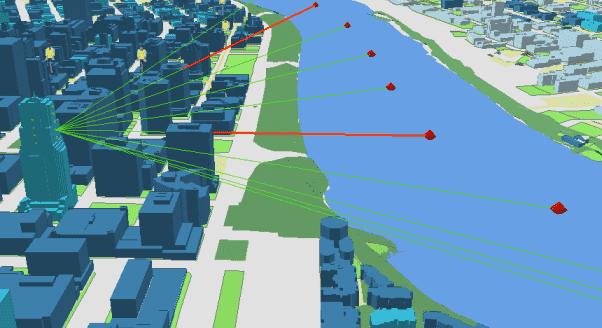
3D Analyst tools provide the ability to create and analyze surface data represented in raster, terrain, triangulated irregular network (TIN) and LAS dataset formats. 3D data can be converted from a rich variety of formats, including COLLADA, LiDAR, SketchUp, OpenFlight and many others. Analyzing the geometric relationships and properties of geographic features, interpolating rasters and various TINs, and analyzing surface properties are just a few of the many functions 3D Analyst provides.
Main functions include:
- 3D Features — provides tools to evaluate geometric properties and relationships between three-dimensional features.
- Working with CityEngine — contains tools that expose some of the capabilities of ArcGIS CityEngine without requiring ArcGIS CityEngine to be installed.
- Conversion — converts feature classes, files, LAS datasets, rasters, TINs and terrains to other data formats.
- Data Management — tools to create and manage terrain, TIN and LAS datasets.
- Functional Surface — analysis tools that evaluate elevation information from raster, terrain and TIN surface data.
- Raster Interpolation — interpolation tools that create continuous raster surfaces from a set of sample points, including hydrologically correct surface models.
- Raster Math — tools that perform mathematical operations on raster datasets.
- Raster Reclass — tools that reclassify raster data.
- Raster Surface — determines properties of a raster surface, such as contours, slope, aspect, hillshade and cut/fill calculations.
- Triangulated Surface — determines surface properties of TIN, terrain and LAS datasets, such as contours, slope, aspect, hillshade, volume calculation and outlier detection.
- Visibility — creates sight lines from an observation point to a geographic feature; intervisibility to multiple points; determines whether sight lines are blocked by obstructions; determines which points can be seen from each observation location.
References: An overview of the 3D Analyst toolbox
2. ArcGIS Spatial Analyst
ArcGIS Spatial Analyst offers a rich set of spatial analysis and modeling tools for both raster data (cell-based data) and vector data. With ArcGIS Spatial Analyst, users can work with many data formats to combine datasets, interpret new data and perform complex raster analyses such as terrain analysis, surface modeling, surface interpolation, hydrological analysis, statistical analysis and more.
With a simple yet powerful interface, ArcGIS Spatial Analyst provides an environment integrated with ArcGIS Desktop for advanced raster analysis, with strong integration with geoprocessing tools that lets users build and run analytical models quickly and easily. These models can be saved so that other users can understand the spatial analysis workflow, and “What-If” scenarios can easily be created and compared.
Users of ArcGIS Spatial Analyst include those who need to build complex analytical models for site selection, those who want to model terrain and visibility, or perform distance, overlay, density or interpolation analyses. Common applications include creating digital elevation models (DEM), calculating crime and population density, modeling surface runoff, modeling wilderness areas, site selection analysis and more.
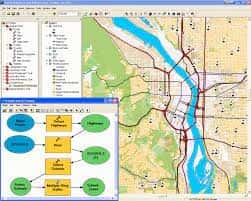
Main toolsets / function groups:
- Density, Distance
- Extraction
- Generalization
- Groundwater and Hydrology
- Interpolation
- Map Algebra, General Math, Math Bitwise, Math Logic, Trigonometric Math
- Multivariate
- Neighborhood
- Overlay
ArcGIS Spatial Analyst can be used to: analyze terrain; find the best location for a store; analyze land use; forecast fire risk; analyze transport routes; determine pollution levels; identify soil erosion risk; analyze crops; analyze demographics; assess risk; evaluate customer behavior.
References: An overview of the Spatial Analyst toolbox · Industry-specific applications (Esri brochure)
3. ArcGIS Network Analyst
ArcGIS Network Analyst is an ArcGIS extension that solves complex routing problems and other challenges related to transportation networks. Users can plan optimized routes for a vehicle or a fleet, locate the closest facilities, define service areas and more. ArcGIS Network Analyst uses a network data model to dynamically represent transportation network conditions — including one-way streets, turn and height restrictions, speed limits and traffic conditions.
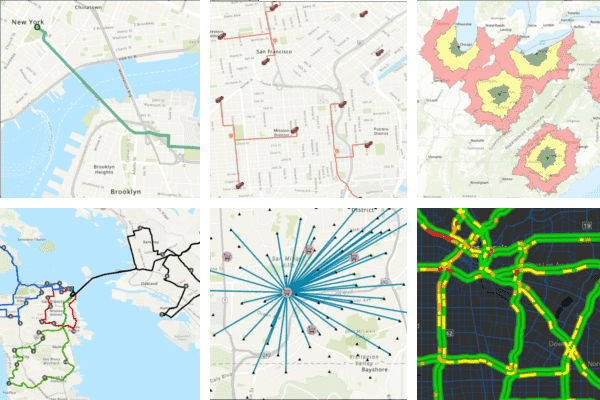
Main functions:
- Find the best routes — optimize based on variables such as distance, time, cost, traffic, vehicle restrictions and more. For example: create multi-stop routes with sequenced stops, define delivery time windows and calculate vehicle capacity.
- Find the closest facilities — find the shortest routes to the closest facilities, helping coordinate emergency response operations, inspection assignments and incident preparedness plans more efficiently.
- Solve multi-vehicle routing problems — coordinate complex situations in which multiple vehicles must serve a number of stops; given a set of stops and a fleet, determine which locations should be served by each route and in what order.
- Find suitable locations (location-allocation) — determine optimal locations for future facilities, helping reduce costs, improve accessibility, and maximize profit and service quality. Retail companies use this analysis to determine where to open new stores.
- Define service areas — define business areas based on travel time, cost or distance (for example: from a given location, which points can be reached within 10 minutes of delivery based on current traffic), then count the residents, customers, offices or key geographic features within each service area.
- Model real-world transportation networks — no-turn rules, speed limits, height restrictions and traffic conditions at different times of day.
- Evaluate multimodal transportation — combine different transportation networks into a single multimodal dataset using coincident points (such as stations or bus stops).
Industries that can apply ArcGIS Network Analyst include transportation, logistics, healthcare, emergency management, utilities, business and more:
- Business: calculate travel times to determine customer sources, taking rush hours and traffic volume into account; determine service commitments based on travel time to customer locations.
- Education: determine bus routes that take curbside accessibility or restrictions such as no-turn, no-U-turn and one-way streets into account.
- Health: determine the fastest routes for home-visit nurses.
- Logistics: calculate routes for delivery vehicles, taking into account truck bans at certain times of day.
- Security and emergencies: determine the fastest routes for rescue teams.
- Retail: find the nearest store based on the customer’s location.
- Electricity, water and telecommunications: reach customers fastest for installation, repair, equipment replacement and technical support.
References: ArcGIS Network Analyst brochure (Esri)
4. ArcGIS Geostatistical Analyst
Geostatistics is a type of statistics used to analyze and predict values associated with spatial or spatiotemporal phenomena. It incorporates the spatial coordinates (and in some cases time) of the data into the analyses. Many geostatistical tools were originally developed as a practical means of describing spatial patterns and interpolating values for unsampled locations. Those tools and methods have since evolved to provide not only interpolated values but also measures of uncertainty for those interpolated values. Measuring uncertainty is essential for informed decision-making, because it provides information about the possible values at each location rather than just a single interpolated value. Geostatistical analysis has also evolved from univariate to multivariate and provides mechanisms to incorporate additional secondary datasets for a primary variable of interest (which may be sparse), thereby allowing more accurate interpolation and uncertainty models to be built.
Geostatistics is widely used in many fields of science and engineering, for example:
- The mining industry uses geostatistics to quantify mineral resources and assess the economic feasibility of projects, then decide which material is sent to the processing plant and which is waste.
- In environmental science, geostatistics is used to estimate contamination levels to decide whether they pose a threat to the environment or human health and to ensure remediation.
- In soil science, mapping soil nutrient levels (nitrogen, phosphorus, potassium, etc.) and other indicators (such as electrical conductivity) to study their relationship with crop yields and to prescribe precise fertilizer amounts for each location in the field.
- Meteorology: predicting temperature, precipitation and related variables (such as acid rain).
- Public health: predicting environmental pollution levels and their relationship with disease incidence.
In all of these examples, the common context is a phenomenon of interest occurring over an area (levels of soil, water or air pollution; the content of gold or other metals in a mine; etc.). Comprehensive studies are costly and time-consuming, so the phenomenon is usually characterized by sampling at various locations. Geostatistics is then used to produce predictions (and measures of uncertainty) for locations that have not been sampled. The general workflow is described in The geostatistical workflow.
Main functions of ArcGIS Geostatistical Analyst:
- Model uncertain data and spatial data
- Explore data
- Build accurate predictions
- Evaluate the quality of prediction models
- Simulation
- Filter and enhance surface data
5. ArcGIS Data Interoperability
ArcGIS Data Interoperability includes tools for converting many data formats using FME technology from Safe Software. FME Suite is an extract, transform and load (ETL) tool for spatial data.
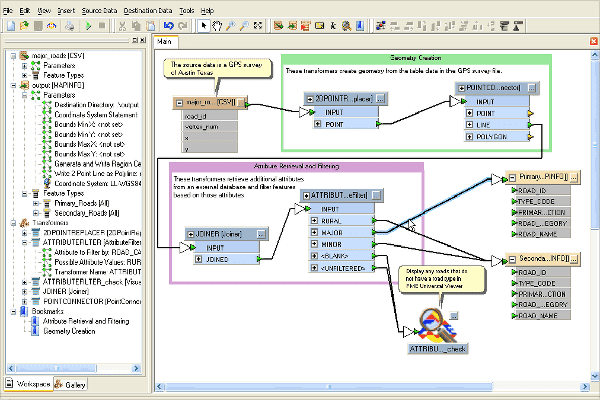
ArcGIS Data Interoperability allows spatial data formats to be integrated into GIS analyses. In addition, this extension provides the ability to model new custom spatial data formats based on built-in formats and converters.
Main functions:
- Direct read — directly read more than 75 spatial data formats and export to more than 50 formats.
- Data translation — automatically convert the source data format to the target data format.
- Data transformation — perform sophisticated manipulation and convert default data formats to custom formats using the Workbench application.
- Fully integrated with geoprocessing models — including the ModelBuilder environment.
6. ArcGIS Data Reviewer
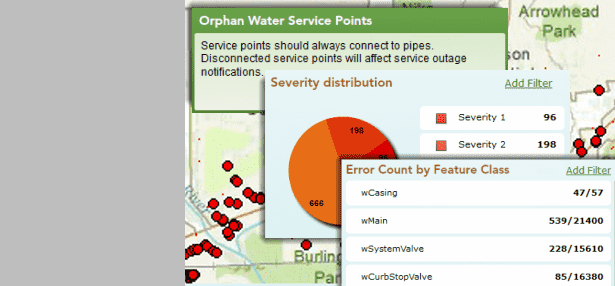
ArcGIS Data Reviewer provides a complete system of validation checks that automate and simplify GIS data quality management, helping to check data quality during database construction and analysis and to improve data accuracy and integrity.
Main functions:
- More than 40 built-in checks to automatically detect errors in data. Users can also configure the checks to meet stringent data quality requirements.
- Tools to support manual and semi-automated data review to identify missing features, misplaced features, incorrect attributes and many other errors that cannot be detected automatically.
- Continuously track, monitor and report on the quality status of GIS data.
- Integrate quality checks into data collection and editing workflows.
7. ArcGIS Workflow Manager
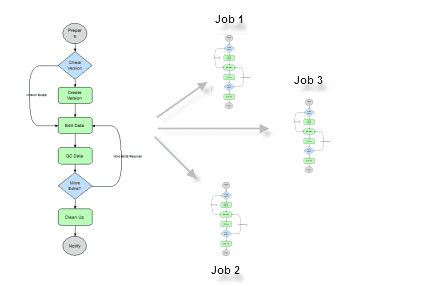
ArcGIS Workflow Manager is a workflow management application for organizations that collect, edit and manage the production of large databases and maps, providing an integrated platform in production environments with multiuser geodatabases. It simplifies resource allocation, job management and monitoring, and streamlines workflows, saving implementation time.
Main functions:
- Quickly create workflows
- Automate workflows and tasks — each step in every workflow can be configured to automate processing tasks
- Integration with ArcGIS — Workflow Manager integrates seamlessly with ArcMap
- Integrate scripts and geoprocessing models in a workflow
- Receive notifications about job status
- Centralized management of documents related to jobs
- Access job information on the web
- Flexible task assignment and delegation