Our world is connected by complex networks: roads, railways, pipelines, and telecommunications networks. How do you find the fastest way to the hospital? How far does a fire station’s 5-minute service area reach? What is the optimal delivery route for a fleet of vehicles? ArcGIS Network Analyst is a powerful extension for ArcGIS Pro, designed to answer exactly these questions by modeling and analyzing real-world networks.
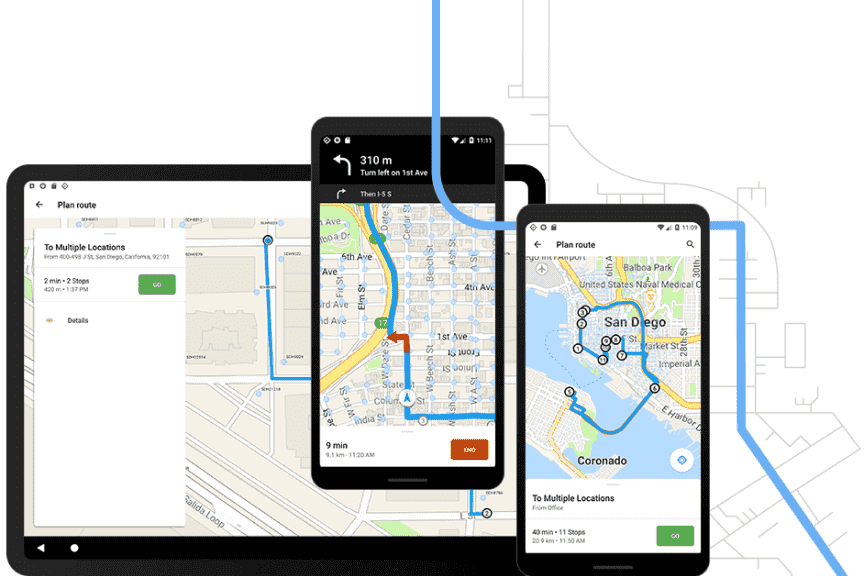
Fundamentally, Network Analyst does not look at a map as a static image. It turns roads into an intelligent, navigable network that takes into account factors such as speed limits, one-way streets, no-U-turn points, and real-time traffic conditions. It is an indispensable tool for logistics, urban planning, retail, and emergency management.
Technical Capabilities and Practical Applications
To perform analysis, you first need a Network Dataset, a special data model built from line feature classes that contains information about connectivity, attributes (cost, travel time), and rules (restrictions). Once you have this dataset, you can use the following powerful analysis tools:
1. Route Analysis
This is the most basic and common function, helping to find the best route between two or more stops.
- Technical capabilities:
- Find Best Route: Calculates the route with the lowest “cost” (which can be the shortest time, the shortest distance, or another custom cost) through a sequence of ordered stops.
- Reorder Stops: Automatically finds the optimal order for visiting a list of stops, minimizing total travel time or distance.
- Time Windows: Lets you set time windows during which a particular stop must be reached (for example, point B must be reached between 9:00 and 10:00 a.m.).
- Practical application:
- Personal navigation: A user wants to find the fastest way from home to work at 8:00 a.m. Network Analyst can calculate the optimal route, taking into account the traffic congestion that typically occurs at rush hour.
- Tourism: A traveler has a list of 5 places to visit in a day. The tool automatically orders the destinations and plots the most sensible itinerary to save travel time.
2. Service Area Analysis
This function helps identify the areas that can be reached from a location within a given time or distance.
- Technical capabilities:
- Create Polygons: Creates polygon areas covering all the roads that can be reached from a source point (for example, a hospital) within a given cost threshold (for example, 5, 10, and 15 minutes).
- Detailed Polygons: Can create detailed service areas that do not fill in areas with no roads (such as parks and lakes), giving a more realistic view of accessibility.
- Practical application:
- Urban planning and healthcare: A city wants to assess access to emergency medical services. It creates 5-minute and 10-minute service areas around all hospitals. The resulting map clearly shows the “white zones”: residential areas outside the quick-access range of any hospital, which supports proposals to build new emergency stations.
- Retail: A pizza chain promises delivery within 30 minutes. It uses service area analysis to precisely define the delivery zone for each store, ensuring it can keep its promise.
3. Closest Facility Analysis
This function helps find one or more facilities (for example, hospitals and fire stations) closest to an incident location.
- Technical capabilities:
- Find N Closest: Finds the N facilities closest to an incident point, based on travel cost over the road network.
- Cutoff Value: Lets you limit the search to a certain cost threshold (for example, only find hospitals within 15 minutes’ travel of the accident site).
- Practical application:
- Emergency management: When a traffic accident occurs, the 911 dispatch system uses this tool to immediately identify the 3 closest hospitals able to receive patients, along with the route and estimated travel time to each hospital.
4. Vehicle Routing Problem (VRP)
This is one of the most complex and valuable analysis tools, designed to optimize routes for a fleet of vehicles that must serve many stops.
- Technical capabilities:
- Fleet Optimization: Automatically groups stops (orders) together and assigns them to the vehicles in the fleet in an optimal way.
- Constraints: Can handle many complex real-world constraints, such as:
- The load capacity and volume of each vehicle.
- Driver working hours.
- Service time windows at each stop.
- The time required to unload at each stop.
- Practical application:
- Logistics and delivery: An e-commerce company has 10 trucks and 200 orders to deliver in a day. The VRP tool calculates and produces a detailed route for each truck: which truck goes where, and in what order, to complete all orders with the lowest total travel distance and time.
- Public utility services: A waste collection company uses VRP to plan daily routes for its fleet, ensuring that all collection points are served as efficiently as possible.
5. Other Analysis Functions
- Origin-Destination Cost Matrix: Calculates a matrix of travel costs (time or distance) between all origin points and all destination points. Very useful for analyzing accessibility and movement at large scale.
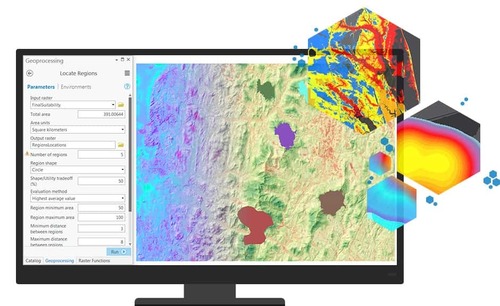
- Location-Allocation: Helps determine the optimal locations for new facilities (for example, schools, stores, and warehouses) to best serve a set of demand points (for example, residential areas), based on objectives such as “minimize total travel distance” or “maximize coverage.”
Conclusion
ArcGIS Network Analyst is a powerful toolset that turns a road network from a static data layer into a dynamic model that can be analyzed. It provides scientific solutions to complex problems in logistics, planning, and operational optimization, helping organizations save costs, improve efficiency, and deliver better services.