ArcGIS Data Reviewer is an extension for ArcGIS Pro and ArcGIS Enterprise that works as a comprehensive Quality Control (QC) system for your GIS data.
In essence, it helps you automate the process of finding, managing and correcting errors in spatial data, ensuring that your database is always accurate, consistent and trustworthy. Think of it as a regular “health check-up” for your GIS data.
Technical Capability Groups and Practical Applications
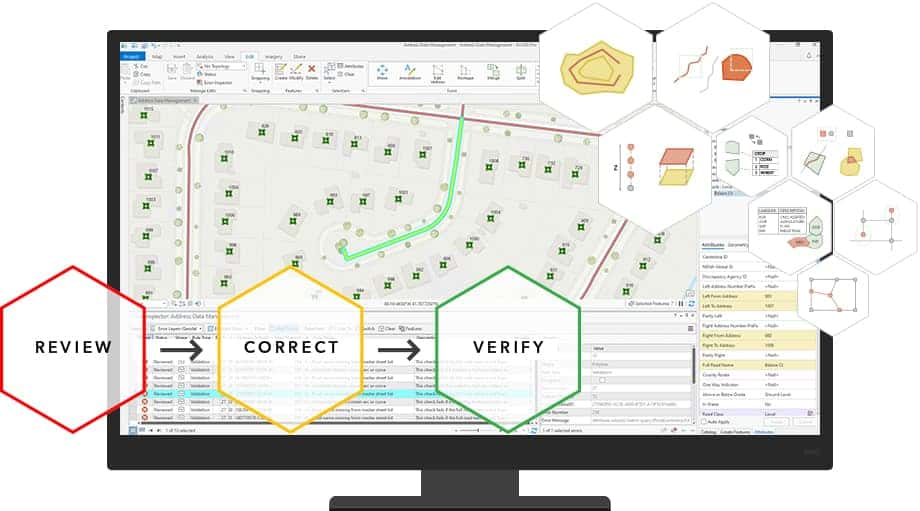
Data Reviewer provides a closed-loop workflow, from defining quality rules and detecting errors to managing and verifying corrections.
1. Automated Rule-Based Review (Automated Review)
This is the core capability of Data Reviewer. It provides a library of more than 40 preconfigured “Checks” to automatically scan your data and look for common errors.
- Technical capabilities: These checks are divided into several groups:
- Geometry Checks:
- Find duplicate features: Finds features that are duplicated.
- Find features with invalid geometry: Detects geometry errors such as self-intersecting polygons and polygons with duplicate vertices.
- Find multipart features: Finds single features that are made up of multiple separate geometric parts.
- Feature Relationship Checks:
- Find gaps between polygons: Finds unwanted gaps (slivers) between adjacent polygons.
- Find overlapping polygons: Detects areas where polygons overlap one another.
- Points must be inside polygons: Checks whether point features lie entirely inside a polygon feature.
- Attribute Checks:
- Validate attribute domains: Checks whether the value in a field complies with a predefined list of values (domain).
- Find null values: Finds important attribute fields that are left empty (null).
- Find unique ID violations: Ensures that each feature has a unique identifier.
- Geometry Checks:
- Practical applications:
- Cadastral data management: A land registration office runs the Find gaps and Find overlapping polygons checks on its land parcel layer. The system automatically flags every location with a boundary error, helping ensure that the total parcel area is accurate and that there are no boundary disputes caused by digitizing errors.
- Residential data management: A city uses the Points must be inside polygons check to ensure that all residential address points lie within the boundary of a parcel or a neighborhood, avoiding errors in administrative management.
2. Error Management Workflow
Data Reviewer does not just find errors; it also provides a system to manage the lifecycle of those errors.
- Technical capabilities:
- Reviewer Table: All detected errors are recorded in a central table. Each record in this table contains detailed information about the error: which feature has the error, what type of error it is, its severity, and its status.
- Error Lifecycle: Each error has a clear status, typically:
- Identified: The error has just been detected.
- Corrected: A user has fixed the error.
- Verified: A manager or QC leader has checked and confirmed that the error was corrected properly.
- Correction and Verification Tools: Provide tools for users to easily zoom to the error location and mark it as corrected, and for managers to verify those corrections.
- Practical applications:
- Multi-user work environment: A team of editors is digitizing a map series together. Every night, an automated process runs the Data Reviewer checks. The next morning, the team leader opens the Reviewer Table to see the list of errors detected the previous day. They can assign each error to a specific editor to fix. After fixing it, the editor updates the status to “Corrected”. Finally, the team leader rechecks and changes the status to “Verified”, completing the process.
3. Semi-Automated and Manual Review
Besides checking the entire dataset, Data Reviewer also supports more flexible review workflows.
- Technical capabilities:
- Sampling Checks: Lets you select a random sample from the data for manual review, instead of having to check everything.
- Visual Review: Provides tools for users to record the errors they find while reviewing data visually. If they see a feature that is misplaced, they can immediately log that error in the Reviewer Table.
- Practical applications:
- Data acceptance process: A government agency receives data from an external contractor. Instead of trusting it completely, they use Data Reviewer to draw a 5% sample of the features for visual quality inspection. If the error rate in this sample is too high, they can reject the entire data batch and ask the contractor to redo it.
Conclusion
ArcGIS Data Reviewer is an essential tool for building and maintaining a “data quality culture” within an organization. By automating tedious checking tasks and providing a systematic error management process, it helps minimize human error, strengthen data reliability, and ultimately ensure that important decisions are made on the most accurate, high-quality information foundation.