ArcGIS Pro is the most modern and powerful professional desktop GIS application in Esri’s ArcGIS ecosystem. Rebuilt from the ground up on a 64-bit architecture, ArcGIS Pro is not just an upgrade but a complete replacement for the earlier ArcMap generation, delivering an integrated workspace, outstanding performance, and seamless connectivity to the web GIS platform. It is the central tool where GIS professionals carry out tasks ranging from mapping, spatial analysis, and data management to sharing geographic information across the entire organization.
Key Features of ArcGIS Pro
ArcGIS Pro was designed with many breakthrough improvements over previous generations:
- 64-bit architecture: Allows ArcGIS Pro to make full use of modern hardware resources, helping process larger datasets, run complex analyses faster, and deliver a smooth, stable experience.
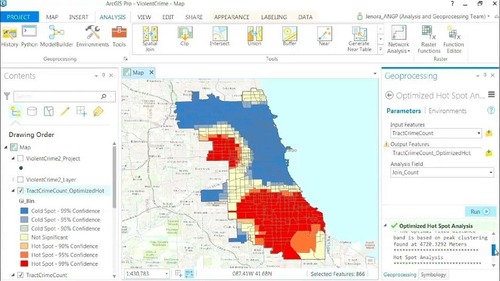
- Modern interface: Uses an intuitive Ribbon interface that changes with the work context, making it easy to find and use the tools you need.
- Project-based working model: Everything related to your work — maps, data, layouts, tools, database connections — is stored in a single project file (.aprx). This keeps work organized and easy to share.
- Comprehensive 2D and 3D integration: There is no longer a separation between 2D maps (ArcMap) and 3D (ArcScene/ArcGlobe). In ArcGIS Pro, you can create, edit, and analyze data in both 2D and 3D environments seamlessly within the same interface.
- Deep integration with the ArcGIS platform: ArcGIS Pro is designed to connect directly to ArcGIS Online and ArcGIS Enterprise. You can easily share maps and data layers as web services, use data from your organization, and collaborate with other members.
The Extensions Ecosystem
The true power of ArcGIS Pro is multiplied by a rich ecosystem of extensions. These extensions act like specialized “toolboxes,” providing additional functions and advanced workflows for specific domains. Below are the most popular and important extensions:
Spatial Analysis & Data Science
- ArcGIS Spatial Analyst: The foundation extension for all analysis based on raster data (gridded data).
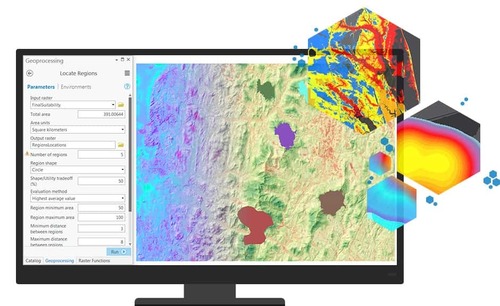
- Functions: Provides hundreds of tools for surface analysis, hydrology, zonal statistics, and above all suitability modeling to find optimal locations based on multiple criteria.
- Applications: Finding the best location for a wind power plant, identifying areas at high risk of landslides, modeling the flow of rivers.
- ArcGIS 3D Analyst: Unlocks analysis and visualization in three-dimensional space.
- Functions: Lets you create detailed 3D surfaces, perform line-of-sight analysis, calculate volumes, and work with LiDAR data.
- Applications: 3D urban planning, simulating the view from a high-rise building, calculating the volume of earth to be cut and filled for a construction project.
- ArcGIS Geostatistical Analyst: Provides advanced spatial statistics tools for interpolating and modeling data.
- Functions: Uses methods such as Kriging to create continuous prediction surfaces from discrete data points, while also assessing the uncertainty of the predictions.
- Applications: Creating air pollution maps from monitoring stations, predicting underground mineral reserves, mapping temperature or rainfall.
- ArcGIS Image Analyst: For analyzing and extracting information from remote sensing imagery.
- Functions: Provides tools for image processing, image classification, change detection, and working with multidimensional imagery. Integrates Deep Learning tools for automated feature extraction.
- Applications: Classifying forest cover, detecting unauthorized buildings, monitoring crop health from satellite imagery.
Data Management & Integration
- ArcGIS Data Interoperability: The bridge connecting ArcGIS Pro with hundreds of different data formats.
- Functions: Allows direct reading, writing, and conversion between spatial and non-spatial data formats (CAD, BIM, XML, Excel, etc.) without intermediate steps.
- Applications: Integrating design data from AutoCAD into a GIS database, exporting GIS data to KML for viewing in Google Earth.
- ArcGIS Data Reviewer: Provides a complete system for data quality checking and management.
- Functions: Automates the detection of errors in data (for example, gaps in polygons, duplicate lines) based on a predefined set of rules, helping ensure the integrity and accuracy of the database.
- Applications: Checking the quality of cadastral datasets before they go into operation, ensuring transport network data is free of errors.
Mapping & Presentation
- ArcGIS Publisher: Lets you share your maps and data as interactive files.
- Functions: Converts map projects in ArcGIS Pro into .ppkx files (ArcGIS Publisher Package) that can be opened by the free ArcGIS Reader application.
- Applications: Sharing detailed planning maps with the public or stakeholders without requiring them to hold an ArcGIS Pro license.
- ArcGIS Production Mapping: Provides specialized tools for standardized topographic and aeronautical map production workflows.
- Functions: Automates repetitive tasks in the map editing process, manages grid-based products, and ensures output quality.
Network Analysis
- ArcGIS Network Analyst: Provides transportation network and logistics analysis capabilities.
- Functions: Finds shortest paths, determines service areas, solves closest facility problems, and optimizes routes for vehicle fleets.
- Applications: Planning delivery routes for a logistics fleet, identifying areas reachable from a fire station within 5 minutes, finding the nearest hospital.
ArcGIS Pro License Levels
ArcGIS Pro has three license levels, each providing a different set of tools and functions:
- Basic: Provides basic tools for creating, editing, and analyzing spatial data, along with professional mapping capabilities.
- Standard: Includes all the functions of Basic, plus advanced editing tools and the ability to manage multi-user spatial databases (enterprise geodatabase).
- Advanced: The highest level, including all the functions of Standard, plus the most advanced toolsets for spatial analysis and data conversion.
Many extensions require a minimum license level to work.
Conclusion
ArcGIS Pro is not just a single piece of software but a comprehensive desktop GIS platform. Its strength lies in the combination of a powerful, modern processing core and nearly limitless extensibility through an ecosystem of extensions, enabling professionals to solve every spatial problem in every field.