In the GIS world, we are used to analyzing features based on their geographic location: what is nearby, what lies within an area, or what spatial distribution patterns exist. But what happens when the most important relationships are not about distance, but about invisible connections: who owns what, which company supplies which project, who communicates with whom, which event leads to which other event? ArcGIS Knowledge Server, a specialized server role of ArcGIS Enterprise, was created to answer these questions, enabling organizations to model, explore and analyze complex networks of relationships through Knowledge Graphs.
What Is ArcGIS Knowledge Server?
ArcGIS Knowledge Server is a licensing role of ArcGIS Enterprise that provides the capability to create, manage, share and analyze Knowledge Graphs. It lets you combine spatial data, non-spatial data, structured data (tables) and unstructured data (text, documents) into a single model, where real-world objects are represented as Entities and the links between them are represented as Relationships.
Imagine you are trying to understand a complex system, such as a supply chain. Traditional GIS can show the locations of warehouses and shipping routes. But a Knowledge Graph can model the entire network:
- Entities: Company A (supplier), Ship B (means of transport), Port C, Warehouse D, Product E, Contract F.
- Relationships: Company A owns Ship B, Ship B is transporting Product E, Product E is part of Contract F, Ship B is scheduled to dock at Port C…
In this way, ArcGIS Knowledge Server enables you to perform link analysis to uncover hidden connections, the most influential entities, and potential weak points in the network that spatial analysis alone cannot detect.
How It Works: From Data to Knowledge
ArcGIS Knowledge Server operates through a process of three main steps:
- Modeling and Data Ingestion:
- You start by defining a flexible data model: the types of Entities you want to track (for example: People, Places, Organizations, Events) and the types of Relationships that can exist between them (for example: Owns, Works for, Met at).
- Next, you load data from many different sources into the Knowledge Graph. The system can automatically extract entities and relationships from existing data tables or even from unstructured text. This data is stored in a dedicated graph data store (Graph Store) managed by ArcGIS Enterprise.
- Visual Exploration and Interaction:
- Users (analysts, investigators) interact with the Knowledge Graph through powerful client tools such as ArcGIS Pro, ArcGIS AllSource (for intelligence analysis), and the web application ArcGIS Knowledge Studio.
- They can explore the network of relationships using visual tools such as:
- Maps: Display entities that have a geographic location.
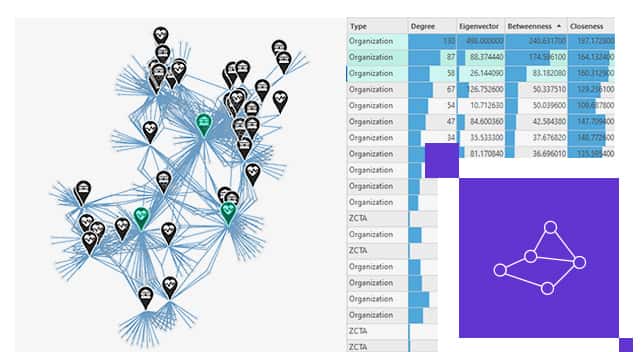
- Link Charts: A spider-web-style network diagram that lets you clearly see “who is connected to whom” without being limited by geography.
- Cards, Charts, Histograms: To view the detailed attributes of each entity and relationship.
- Analysis and Querying:
- This is the real power of Knowledge Server. You can perform advanced types of analysis such as:
- Find Paths: Find the shortest chain of connections between two entities. For example: “How is individual A related to company Z?”
- Centrality Analysis: Identify the most important entities in the network (for example: the person with the most connections, or the person who plays the most important bridging role). The latest version (11.5) also supports weighted calculations, which helps assess the importance of relationships.
- Community Detection: Automatically find groups of entities that are densely connected to one another.
- Complex queries: Ask complex questions that combine attributes, space and relationships. For example: “Find all companies with assets located in a flood zone that are also the main suppliers for project X.”
- This is the real power of Knowledge Server. You can perform advanced types of analysis such as:
Detailed Use Cases
ArcGIS Knowledge Server is not limited to any particular industry. Below are detailed examples:
1. Criminal Investigation and National Security
A law enforcement agency is investigating a criminal network.
- Input data: Case reports (text), call records, financial transaction data, lists of known gang members, case locations (spatial data).
- Knowledge Graph model:
- Entities: Individuals, Phone numbers, Bank accounts, Vehicles, Cases, Places.
- Relationships: Owns (a person owns a phone number), Made a call to, Transferred money to, Is a member of, Occurred at.
- Analysis process:
- The analyst starts with a known suspect. They create a link chart to see all of this suspect’s relationships.
- They discover that the suspect frequently calls 3 different phone numbers.
- Using the Find Paths tool, they check whether these 3 phone numbers are connected to one another. The results show that all three have transferred money into a common bank account.
- They continue expanding the chart from this bank account and discover the ringleader, the person in whose name the account is registered, someone who had never appeared in the records before.
- They move the entities that have locations (residences, case locations) onto a map to perform hot spot analysis, identifying the network’s “area of operation”.
2. Supply Chain and Risk Management
A global manufacturing corporation wants to strengthen its resilience against disruptions.
- Input data: Supplier lists (tier 1, 2, 3), lists of products and components, shipping data, factory and warehouse locations, risk data (weather, political instability).
- Knowledge Graph model:
- Entities: Suppliers, Factories, Components, Final products, Shipping routes, Seaports, Risks (for example: Storms).
- Relationships: Supplies (a supplier supplies a component), Manufactured at (a component is manufactured at a factory), Shipped via (goods pass through a route/port).
- Analysis process:
- A major storm is forecast to make landfall at an important seaport. On the map, the analyst sees that this port lies within the affected area.
- They query the Knowledge Graph: “Which suppliers and components depend on this seaport?”
- The system immediately displays a network of tier 1, 2 and 3 suppliers whose shipping routes pass through that port, along with a list of the critical components affected.
- Using centrality analysis, they identify a “key” component supplier whose disruption would affect 70% of their production line.
- They quickly query to find alternative suppliers that can provide similar components and are not located in the affected area, thereby minimizing the impact of the disruption.
3. Interdependent Infrastructure Analysis
A city wants to understand the interdependencies among critical infrastructure systems (electricity, water, telecommunications).
- Input data: Power grid diagrams, water supply network maps, locations of substations, pumping stations, telecommunications towers, hospitals, data centers.
- Knowledge Graph model:
- Entities: Substations, Hospitals, Pumping stations, Telecommunications towers, Data centers.
- Relationships: Supplies power to, Depends on.
- Analysis process:
- A main substation fails.
- The analyst queries: “If Substation A stops operating, which assets will be affected?”
- The Knowledge Graph does not just show the buildings that lose power. It shows a domino chain: Substation A loses power → Pumping Station B loses power → Hospital C loses its backup water supply. At the same time, Telecommunications Tower D also loses power, affecting the rescue team’s communications.
- This deep understanding helps the city prioritize restoring power to the assets with the greatest cascading impact, instead of simply repairing them one after another.
Conclusion
ArcGIS Knowledge Server represents an evolution of GIS, from a system focused on “what is where” into one that can also answer “who, what, why and how”. By combining spatial analysis and link analysis, it provides an entirely new lens for viewing complex problems, helping organizations uncover knowledge hidden deep within their data and make more comprehensive decisions than ever before.