ArcGIS Enterprise is the foundational software system for building Web GIS systems, enhancing and extending the ability to map and visualize, analyze and manage data on the Web. It is the backbone for running Esri’s ready-to-use applications as well as GIS applications that users develop themselves. ArcGIS Enterprise is tightly integrated with ArcGIS Desktop and ArcGIS Pro, and connects seamlessly with ArcGIS Online to share GIS content between systems.
Collaboration and flexibility are at the heart of ArcGIS Enterprise, allowing users to organize and share their GIS data, information and applications on any device, anywhere, anytime.
ArcGIS Enterprise gives administrators full control over the deployment and operation of a Web GIS system. It can run on Microsoft Windows, Linux and Kubernetes, and can be deployed on a single small server as well as in a large multi-server system, on:
- Public cloud infrastructure
- Private cloud infrastructure
- On-premises infrastructure using physical hardware or virtualization
Components of ArcGIS Enterprise
This flexibility opens up advanced capabilities to support different needs, such as real-time data tracking, big data analytics, raster imagery analysis, image hosting services and data processing workflows. ArcGIS Enterprise can also be deployed in environments with or without an Internet connection, and can be configured to prevent data loss and system downtime in the event of a disaster.
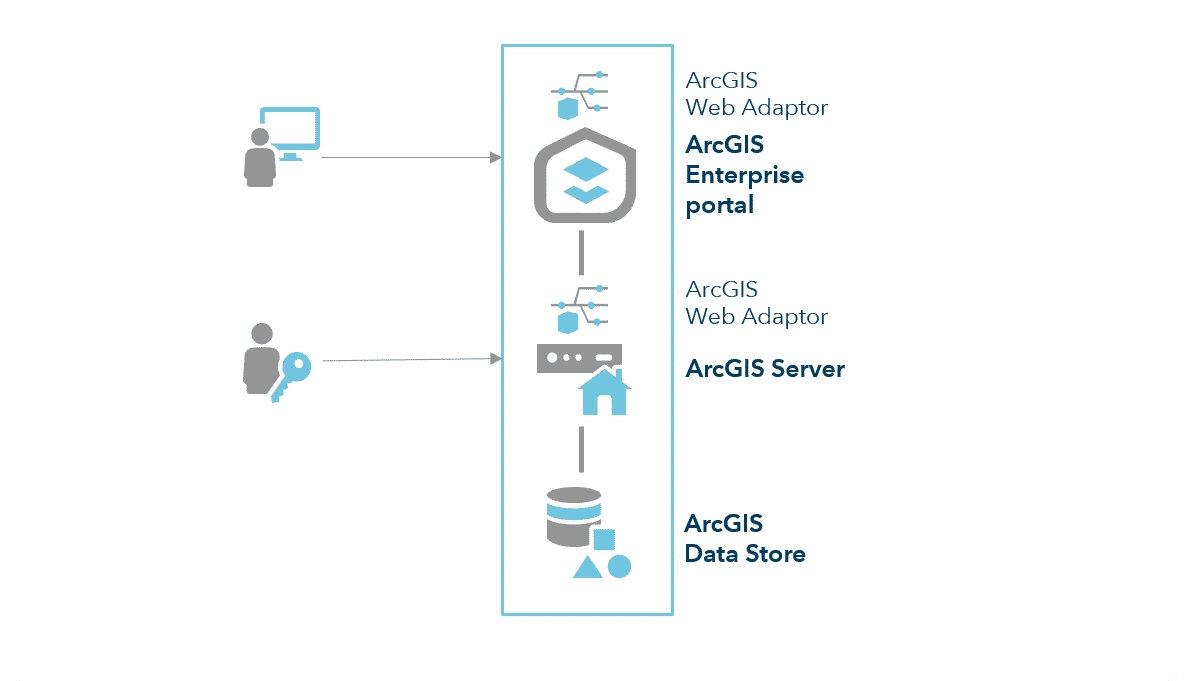
Four components of ArcGIS Enterprise work together to deliver comprehensive capabilities for web mapping, exploiting remote sensing imagery, real-time data processing, large-volume batch analytics and spatial analysis:
- ArcGIS Server supports mapping and analysis in GIS applications. ArcGIS Server consists of several server software products with specialized roles and functions, and can scale flexibly to support the system as traffic increases. These include ArcGIS GIS Server, ArcGIS Image Server, ArcGIS GeoEvent Server, ArcGIS GeoAnalytics Server, ArcGIS Notebook Server and ArcGIS Workflow Manager Server.
- ArcGIS Enterprise portal is a centralized GIS portal where users create, share and manage maps, applications and geospatial data, and share that content with others.
- ArcGIS Data Store provides fast data storage for the hosting server used with your deployment.
- ArcGIS Web Adaptor integrates ArcGIS Server and the ArcGIS Enterprise portal with web servers and with the organization’s existing security infrastructure.
A base ArcGIS Enterprise deployment is a minimally configured system that combines all four of the ArcGIS Enterprise components above. Once such a base deployment is installed, ArcGIS Enterprise can be used as is or can be configured to enable additional capabilities.
ArcGIS Enterprise Licensing
ArcGIS Enterprise is licensed by the number of users and by system capacity. Users are licensed based on user types, with secure access to information and the ability to create GIS content.
ArcGIS Server Roles
ArcGIS Server consists of several server software products with different roles that are licensed individually, depending on the functionality of each server software that an organization wants to deploy. For details on functions and options, please see: ArcGIS Enterprise Capability Matrix.
ArcGIS GIS Server provides GIS resources such as map services, feature services and geoprocessing services to users as map layers. This role is the foundation of a Web GIS system, in which GIS Server acts as the hosting server of the ArcGIS Enterprise portal. ArcGIS GIS Server comes in 3 editions: Advanced, Standard and Basic. All editions of ArcGIS Enterprise include an ArcGIS Server licensed in the GIS Server role. ArcGIS GIS Server also provides additional extension modules. See “ArcGIS GIS Server Features and Extension Modules” for more details.
Note: The Basic edition of ArcGIS Server can only provide management of a large enterprise geodatabase and cannot serve as the hosting server for a Web GIS system.
A base ArcGIS Enterprise deployment can be given additional capabilities by ArcGIS Server software components with different roles:
- ArcGIS Image Server manages remote sensing imagery, publishes imagery services for real-time display and performs raster analysis on distributed systems.
- ArcGIS GeoAnalytics Server performs analysis of large volumes of tabular data and feature data on distributed systems.
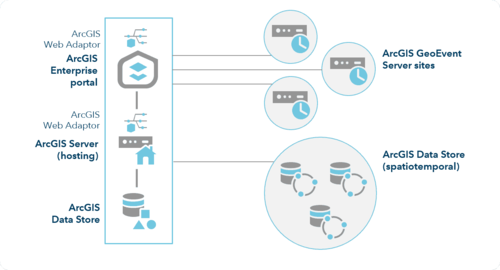
- ArcGIS GeoEvent Server integrates real-time data streams and event-based data streams, such as those from Internet of Things sources, into the GIS.
- ArcGIS Notebook Server hosts ArcGIS Notebooks, which combine coding tools, mapping and real-time data visualization with data processing tools to support data science workflows.
- ArcGIS Workflow Manager Server is a scalable workflow management system that automates and simplifies many aspects of carrying out and managing GIS and non-GIS workflows in an organization.